

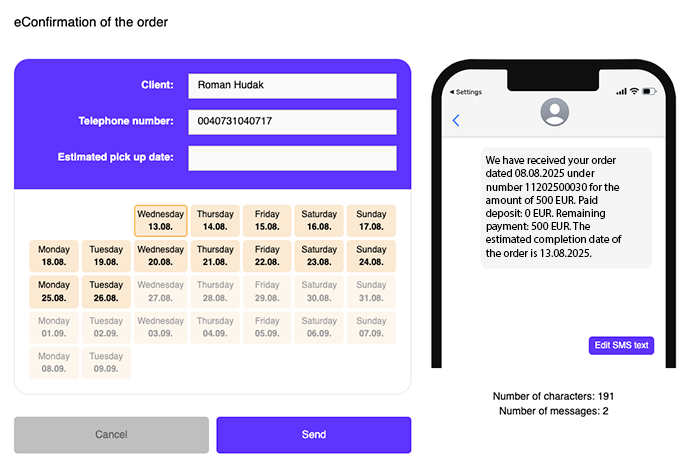
You don’t have to print an order card for the client. Send order information immediately via SMS when saving the order! When the order is created, the client receives an SMS with the order number, deposit amount, remaining balance, and expected completion date. You can also add measurement results from the work card (Sph/Cyl/Axis/Add).
The feature is free and available to everyone! If you want to start using it, just contact us and we will gladly activate it for you.
Window display
The SMS sending function only appears during the FIRST saving of the order. When saving after an edit, it will no longer appear. For the window to appear automatically, the work card must be filled in the order. In case of a paid deposit, the window appears after printing the document; if the deposit is unpaid, it appears after saving the order. The window also will not pop up automatically if you performed an anonymous sale.
SMS text
It is pre-set but can be individually customized by pressing the button under the text.
SMS sender
The company/store must have an SMS sender set up in TISS. In Slovak, the name is optional up to 11 characters. In Czech, the name is set as "Optika".
Additional sending
You can also send the SMS additionally by going to the menu via the arrow button on the left side of the specific order row.


